Getting Started
What is Co-Design Assistant?
Co-Design Assistant is an AI-powered collaborative platform that guides multidisciplinary teams through a structured co-design methodology to plan, assess, and refine digital services. It is developed as part of the DestinE (Destination Earth) initiative — the European mission to build a high-precision digital model of the Earth.
The platform addresses a core challenge: Grand-Distance — the knowledge and relationship gap between disconnected stakeholder communities (researchers, engineers, policy-makers, end-users) who must work together to create viable Earth Observation services.
The platform combines:
Conversational AI — An assistant that guides you step-by-step through the methodology
Structured templates — Standardised forms to capture project knowledge at each phase
Diagnostic tools — Assessments to evaluate project maturity across 5 dimensions
Collaborative workspace — Shared projects where multidisciplinary teams co-create
Why Use Co-Design Assistant?
Co-Design helps you:
Validate your idea early — The Flash Diagnosis quickly reveals strengths and weaknesses before you invest resources
Structure collaboration — The 4-phase methodology ensures nothing is forgotten or overlooked
Bridge knowledge gaps — The AI assistant helps connect disparate domains and stakeholder perspectives
Build for longevity — The Resilient-Fit approach considers multiple time horizons, avoiding short-term fixes that don not scale
The 4-Phase Methodology
Co-Design follows a structured process divided into 4 phases. Each phase produces concrete deliverables that feed into the AI’s understanding of your project.
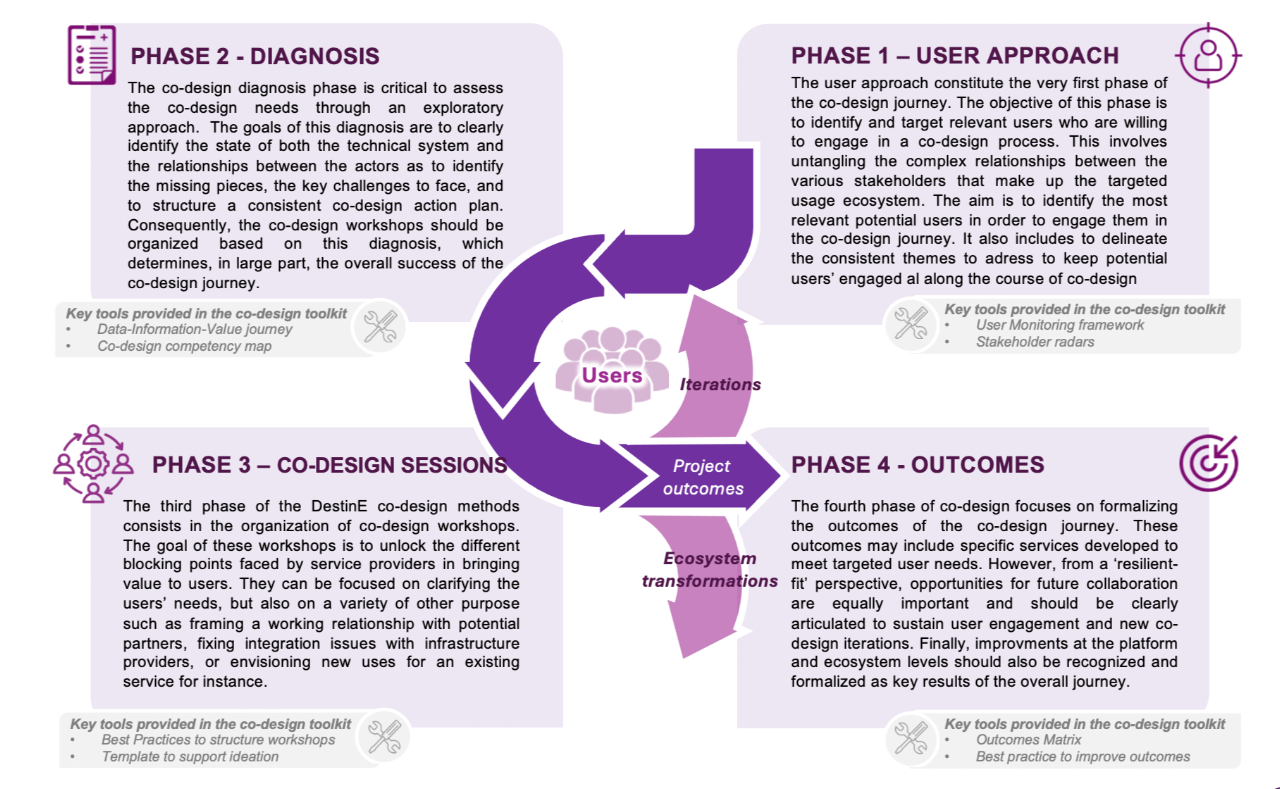
Overview of the 4-phase Co-Design methodology — from user identification to outcome formulation.
Phase |
Name |
What you do |
Example |
Key deliverables |
|---|---|---|---|---|
1 |
Approaching Users |
Identify and engage potential users through a progressive process: preliminary diagnosis of the use ecosystem, targeting promising users, establishing first contacts, and building co-design relationships. |
e.g. contacting local water agencies to validate interest in a flood forecasting service |
User Monitoring Framework, Stakeholder ID Cards |
2 |
Co-Design Diagnosis |
Assess the technical system (data, information, usage, value) and actor relationships using the Data-Information-Value (DIV) framework. Identify missing elements, key challenges, and structure a co-design action plan. |
e.g. mapping which DestinE datasets are available and which stakeholders produce or consume them |
DIV Assessment, Co-Design Action Plan |
3 |
Workshop Sessions |
Organise collaborative workshops with users to clarify needs, build working relationships, address integration issues, and explore service uses. Each workshop follows a tailored protocol guided by the diagnosis findings. |
e.g. a half-day session where end-users sketch their ideal dashboard for drought monitoring |
Workshop Reports, User Needs Documentation |
4 |
Outcomes |
Formulate co-design outcomes using a resilient-fit approach: synthesise key findings, build a strategic roadmap across time horizons (short/mid/long-term), and plan for capacity building, research opportunities, and sustained collaboration. |
e.g. defining a 6-month pilot with a public agency and a 3-year scaling plan with additional partners |
Outcomes Diagram, Resilient Action Plan |
Tip
You don’t need to complete all phases in one sitting. The platform saves your progress and the AI picks up exactly where you left off.
The 5 Dimensions
Every project is evaluated across 5 dimensions that reflect different aspects of readiness:
Dimension |
What it measures |
Example questions |
|---|---|---|
Usefulness |
Does the project solve a real, validated problem? |
Have you identified target users? Is the value proposition clear? |
Operability |
Can it be technically implemented? |
Are data sources available? Is the infrastructure ready? |
Usability |
Will target users actually use it? |
Are users involved in design? Are feedback loops in place? |
Sustainability |
Is it viable long-term? |
Is there a funding model? Who maintains it after launch? |
Scalability |
Can it grow and adapt? |
Can it handle more users/data? Are partners engaged? |
These dimensions are scored during diagnosis and visualised as a radar chart — helping you quickly spot weaknesses.
Quick Start
1. Sign in
Navigate to the platform URL and authenticate with your organisation credentials (via Keycloak SSO).
2. Start a Flash Diagnosis (optional but recommended)
Not sure if your project is ready? Start with a Flash Diagnosis:
Answer 12 questions across the 5 dimensions
Get an AI-generated assessment with a radar chart
Receive personalised recommendations for improvement
Convert the diagnosis into a full project if you want to proceed
This takes about 10 minutes and gives you immediate, actionable feedback.
3. Create a project
From the home dashboard:
Click “Create Project”
Fill in the form: project name, author, domain, organisation, expertise, service idea, and objectives. A description is optional.
You become the Admin of the project
Tip
Be specific in your service idea — the AI uses this to tailor its guidance. “A dashboard for farmers” is less helpful than “A decision-support dashboard combining Copernicus satellite data with local sensor readings to optimise irrigation schedules.”
See Using the Platform for full details on each field.
4. Invite your team
An invite code is automatically generated when you create a project. Share it with collaborators so they can join via “Join an existing co-design journey” on the welcome page.
See Using the Platform for the full flow.
5. Start co-designing
Open your project and start a conversation with the AI assistant:
The assistant guides you through each phase in order
It suggests relevant templates when structured input is needed
It searches your accumulated knowledge to give contextual answers
Templates appear as interactive forms directly in the chat
Completed templates enrich the AI’s understanding of your project
        graph TD
    User --> Template
    User --> Chatbot
    Chatbot --> Template
    Chatbot --> KB["Knowledge Base"]
    Template --> KB
    KB --> Chatbot
The virtuous knowledge cycle — the user interacts with templates and the chatbot; both feed the Knowledge Base, which in turn enriches the chatbot’s responses.
What Happens Next?
As your team progresses:
Phase 1 — Approaching Users — You identify stakeholders and define the project scope
Phase 2 — Co-Design Diagnosis — You assess the technical landscape and integration needs
Phase 3 — Workshop Sessions — You build user profiles and map journeys
Phase 4 — Outcomes — You plan for sustainability and define success metrics
The Roadmap shows your progress. The Knowledge Base centralises everything you’ve produced. Periodic diagnosis re-assessments track how your project matures over time.
Note
The platform is accessible via any modern web browser. No installation required.